
Run continuously, then stop at a moment worth inspecting.
Temporal Mode
Watch a mathematical system change over time.
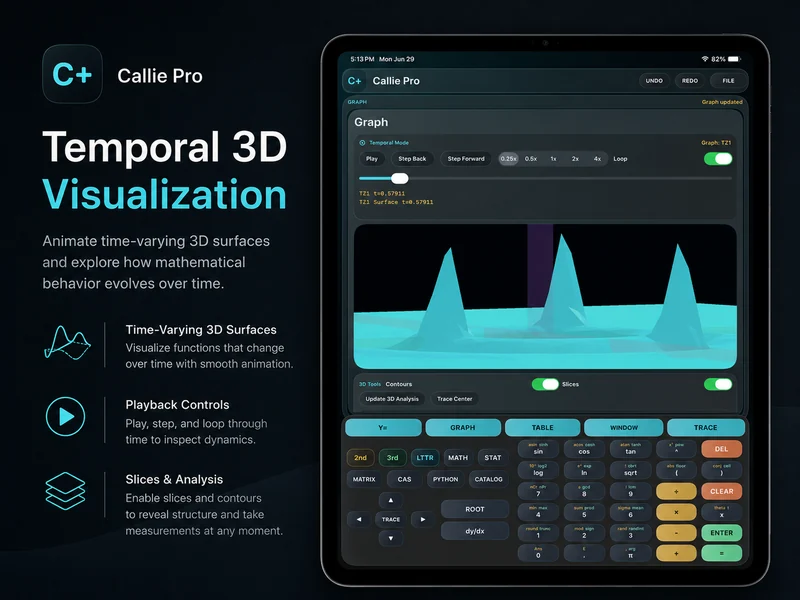
Temporal Mode adds controlled time playback to supported graph types so you can play, pause, step, loop, change speed, and inspect values at a specific moment.
The goal is not animation for its own sake. Playback stays connected to Trace, live readouts, slices, contours, and the graph settings used to understand the model.
Use the graph type that matches the model.
Temporal Function, Parametric, Polar, Complex, and 3D Surface modes keep time-driven fields explicit and separated from ordinary static graphs.
Move backward or forward when a transition matters more than the full loop.
Slow down or accelerate playback without changing the underlying expression.
Compare synchronized behavior.
Supported temporal fields can share the same time position, making it easier to compare related paths or functions without manually aligning separate plots.
Read the model at the current moment.
Live values, Trace, contours, and slices keep the animation tied to inspectable mathematical output.
Related Callie Pro topics
Keep exploring the math.
Explore Callie Pro in depth.
The user guide covers graphing, Temporal Mode, Complex 3D, CAS, Python, Matrix, Stats, Table, Trace, constants, and export workflows.