

Solve, simplify, expand, and factor without reducing every result to a decimal.
Callie Pro for mathematicians
Move from symbolic structure to visual and numerical exploration.
Callie Pro keeps CAS, graphing, complex analysis, matrices, statistics, Trace, Table, Temporal Mode, and a local Python math workspace inside one iPad environment.
It is built for the part of mathematics where the next useful view may be an exact expression, a graph, a surface, a table, a trace point, or a small computation.
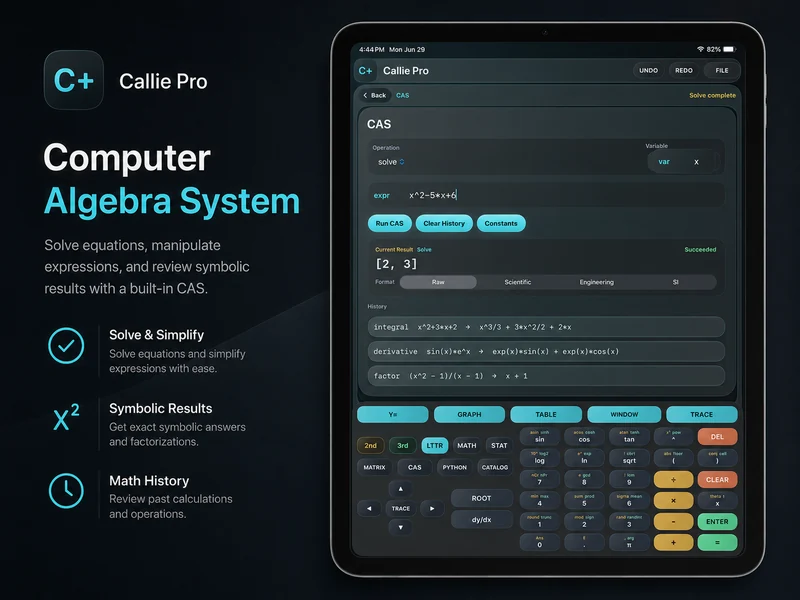
Exact work
Keep symbolic structure intact.
CAS supports operations such as simplify, factor, expand, solve, differentiate, integrate, evaluate limits, and substitute values. Results remain visible in a history that makes the path through a problem easier to review.
Differentiate, integrate, and evaluate supported limits from the same workspace.
Move from an expression into graph, Table, and Trace views when visual behavior matters.
Complex analysis
Explore paths, mappings, and surfaces over the complex plane.
Complex 2D and Complex 3D modes support visual work with roots, poles, branch cuts, logarithms, square roots, singularities, rational functions, and transformations.
- Choose magnitude, argument, real, or imaginary height views.
- Use Trace for supported exact point inspection.
- Apply contours and slices when a surface needs another view.
Experiments
Use local scripts when a formula becomes a numerical question.
The protected Python workspace supports visible numerical scripts and calculator-style experiments while Matrix and Stats keep systems and datasets close.
Related Callie Pro topics
Keep exploring the math.
Explore Callie Pro in depth.
The user guide covers graphing, Temporal Mode, Complex 3D, CAS, Python, Matrix, Stats, Table, Trace, constants, and export workflows.